
Use an iPhone 11 or newer with the front-facing camera.
- Hold the device 19–34 cm (7–13 inches) away from the limb.
- Slowly move the device around the body part, ensuring complete coverage.
- See below how to scan with your iPhone
What can I scan with my iPhone?
iPhones are great at capturing positive models such as patient limbs and plaster positives. You can try capturing the inside of a cast by clicking "Cast Mode" in the Galileo scanner; however, iPhone's limited depth perception may make it difficult to scan deep casts.
Scanning with a mirror attachment
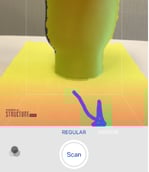 If you have a hard time seeing what you're doing using just the iPhone, you may consider adding a mirror attachment.
Note: Toggle on "MIRROR" mode before starting your scan (pictured right). This will reverse the final scan so it doesn't appear mirrored.
See the below video for a reference on what phone positioning actually looks like using the mirror.
Additional Resources
-
Learn more about scanning with the free Galileo Scanner App here.