
Unloading Filament
You can unload filament in four simple steps:
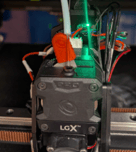
1. Push the red tension lever all the way to the left. This will release toolhead's tension, allowing for filament to be removed from the toolhead.
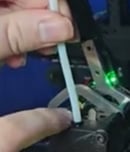
2. Remove the guide tube by pressing down on the black ring and pulling up on the tube.
3. Pull on filament, and it should slide out easily. Feed it back up through the guide tube and respool it onto the roll.
4. From the dehydrator, pull the filament from the guide tube until you can safely remove the filament spool from the dehydrator. Secure the loose filament end into the side of the spool.
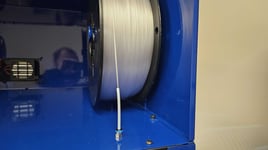
Note: Always have a firm grip on the loose filament end as you're removing it from the kiosk/dehydrator. Letting go of the loose filament end will result in tangled filament.
Loading Filament Settings
Follow the below chart to know how to load filament for the type of product you're printing.
|
Product Type |
Filament Type |
Loading Temp |
Tension Clicks |
|---|---|---|---|
|
Check Socket |
PETG |
240 |
1 Click |
|
Flexible Inner Cosmetic Cover |
TPU (Cheetah) |
240 |
1 Click |
|
Preparatory Socket |
PC Blend |
260 |
1 Click |
Loading Filament
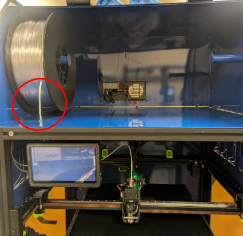
1. Insert the filament roll on side that has the guide tube sticking up.
2. Cut filament end at a 45 degree angle so it is pointed at the end.
3. Feed the filament down into the guide tube until it comes out the other side.
4. Click on the temperature to the right of Extruder.
5. Type in the temperature according to the above chart.
6. Click the check mark, and then click X.
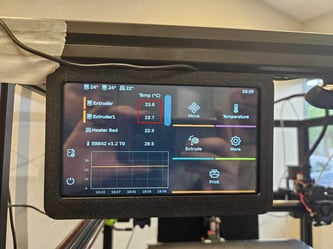
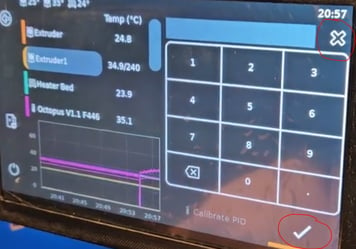
After the toolhead has heated up...
7. With the red tension set to 0 clicks (all the way left), insert the filament into the top of the toolhead.
8. After filament is inserted, set the tension to the appropriate click (1 for PETG, 2 for TPU)
9. Insert the guide tube back into the top of the toolhead so it locks in place.
- Set the distance to 15 and the Speed to 5
- Then click "Extrude."
- If filament does not come out, click "Extrude" again
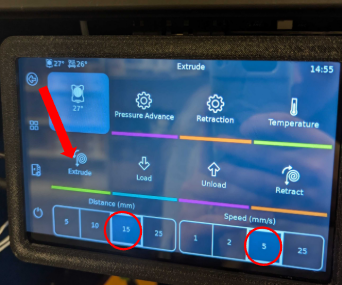
Note: If the Filament isn't extruding, give the filament a brief tug.
- If the filament pops out, flip the red tension lever to the left and push the filament a bit deeper than before.
- Afterwards, flip the lever to the right and attempt to lightly pull the filament out. It should remain firmly within the toolhead.
Job's Done!
If you are printing a preparatory socket using PC Blend, please apply adhesive to the bed following this guide.