
Summary
-
Order bed adhesive through the filament order form.
-
Magigoo PC: use when printing PC Blend preparatory sockets on Galileo O&P and Galileo Pro 2.0
-
Bed adhesive is not needed when printing PC Blend AFOs since AFOs use a PETG raft for adhesion.
-
-
Magigoo PA: use when printing Nylon AFOs on Galileo O&P.
How do I apply the adhesive?
-
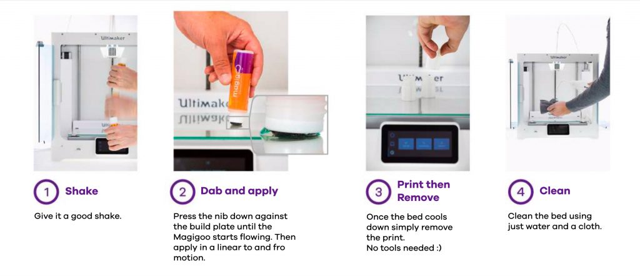
Make sure the bed is clean from debris.
-
Shake the bottle, press the nib onto print bed, squeeze out glue, and then wipe it around. We want a thick, even layer without clumps.
-
Set the bed temperature to 60 degrees for five minutes to let the glue dry.
-
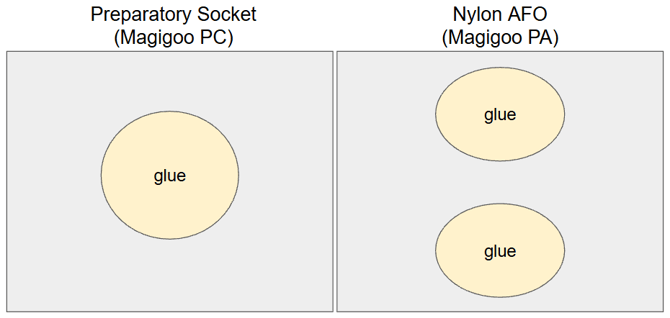
Preparatory Sockets (PC): We recommend covering an area in the center of the bed in a circular fashion, roughly 4-5” in diameter, before starting your print.
-
Nylon AFOs (PA): We recommend covering the bed in two areas - the front and back of the middle 1/3 of the bed, as shown in the diagram below.
-
How often do I re-apply the adhesive? Once every 2 prints. If the residue is still present, you may be able to go 3 prints without re-application.
-
When should I clean my bed? After 10 prints, or when there is substantial buildup (~1mm). This is advised to prevent excessive buildup. Cleaning is not necessary if switching to another filament. Once the glue has been applied, clean the glue off before flipping the bed over (particularly for Magigoo PA).
-
How do I clean my bed? Simply wipe down your print bed with water and cloth. It should wipe off very easily.