
Proper kiosk and 3D printer maintenance is essential for keeping your machine running and performing at its most optimal level. It is highly recommended to complete this checklist every month. See below to find out what's required and why.
Deep Clean the Build Plate - Once Per Month or As Needed
- Carefully remove any large pieces of plastic by hand/with the scraper.
- Don't push too hard or you'll remove the textured surface from the flex plate.
- Pour 90% or 99.9% isopropyl alcohol onto a paper towel.
- Wipe/Scrub the plate until clean.
Why is this important?
-
Allows object to properly stick to the bed by removing any dust, debris and residue from the build plate.
Clean the Cabinet - Once Per Month
- Remove pieces of plastic filament or debris.
- Vacuum up the smaller debris (from fan and gear cleaning).
- Use a microfiber cloth to dust all the inside and outside walls of the cabinet.
- Use a wet (water) microfiber cloth to wipe off the front window.
>> Do NOT use any cleaning solutions on the window to keep it crystal clear.
Why is this important?
- Prevents plastic getting stuck in the belts/other parts of the printer.
- Keeps your kiosk looking brand-spanking new.
Extruder Gear Maintenance - Once Per 6 Months
-
Apply a small dot of white lithium grease to the exposed double gear while it is spinning during a filament change. Just enough to get a film on the teeth.
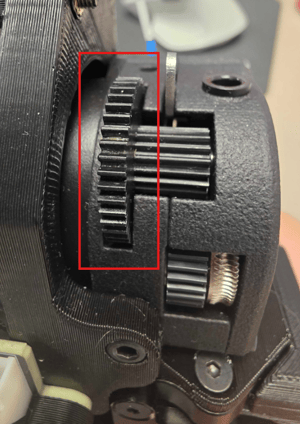
- This can be performed every 6 months.
Why is this important?
- Keeps the gears rotating smoothly after 6 months of printing.
Rail Maintenance - Once Per Month
- Use a lint-free cloth to remove dust and debris from the rails.
- Gently wipe along the length of the rails to avoid scratching.
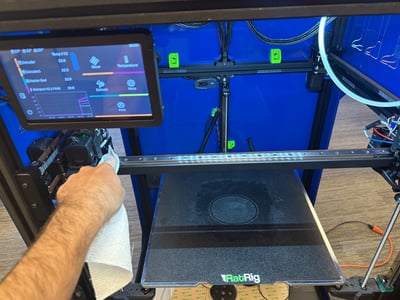
- Check for any signs of wear or damage while cleaning.
- Apply three drops of the 3-in-1 oil supplied with the printer to both Y-side rails and top of the gantry rail. Run toolheads across oil.
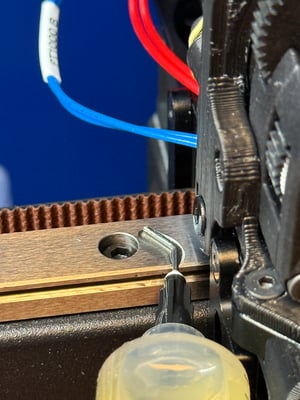
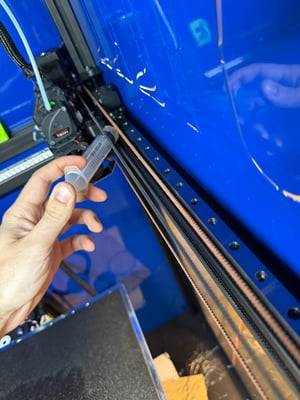
- Leaving a thin film, wipe away excess oil.
- Apply a drop of the 3-in-1 oil supplied with the printer on the three Z lead/motion screws (two in front, one in back middle).
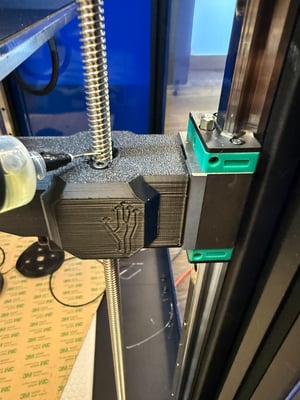
Why is this important?
-
It decreases friction and wear, providing a smoother print finish.
- Prevents squeaking while printing.