
If you would like to shut off your printer to reduce power consumption, or you wish to unplug the machine from the outlet, you will need to properly shutdown the printer beforehand.
Failure to do so will cause background updates to corrupt, thus preventing you from using your printer.
While in a powered-down state, with the printer plugged in, it is estimated the printer will use 5-15Wh of electricity.
Power Down Steps
Note: If you wish to safely unplug the machine, please wait at least 1 minute after powering down before removing the power cable.
Step 1 |
Step 2 |
Step 3 |
|
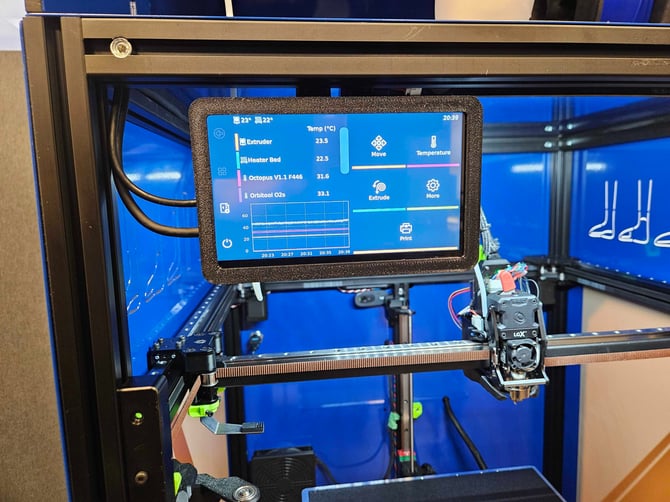
On the display, locate and press the Power Icon at the bottom-left. |
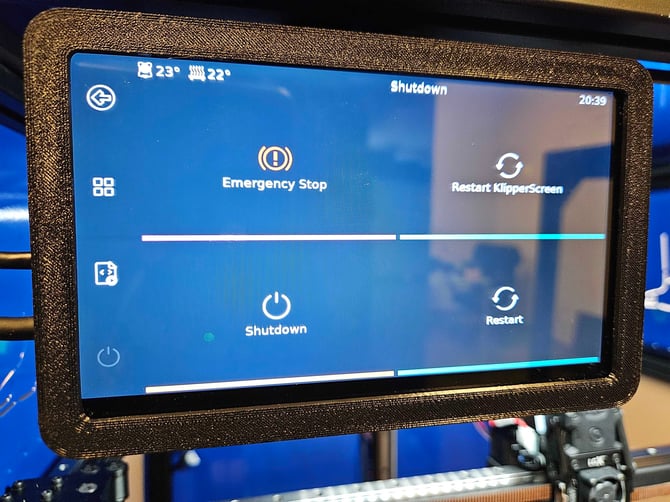
This will bring you to the Power Menu. Please press Shutdown.
|
From here, we can press Both. The screen will run lines of code, then turn black.|
|
Power Cycle Steps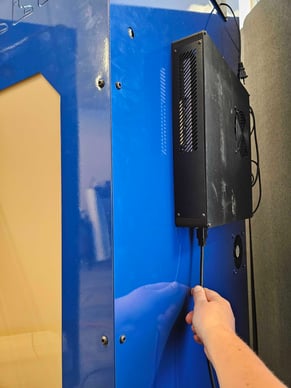
To initiate a power-cycle, you must first properly power-down the printer and wait at least 1
minute.
Then, you may unplug the printer. Locate the black box at the back of the kiosk. You can find a black power cable underneath to safely unplug.
If you wish to turn your printer back on, simply plug the power cable back in. We strongly advise that you wait at least 10 seconds before plugging back in.